Every accountant has had that call: “Sir, we haven’t received the cheque.” Then begins the search through cheque book stubs and bank statements. A cheque register stops that. One row per cheque, and you know in seconds what was issued, to whom, and whether it has cleared. Here’s a free Excel template I’ve set up the way I’d want to use it myself.
Download Cheque Register (.xlsx, free)
No sign-up. Works in Microsoft Excel and Google Sheets.
What’s inside the file
1. Cheque Register sheet
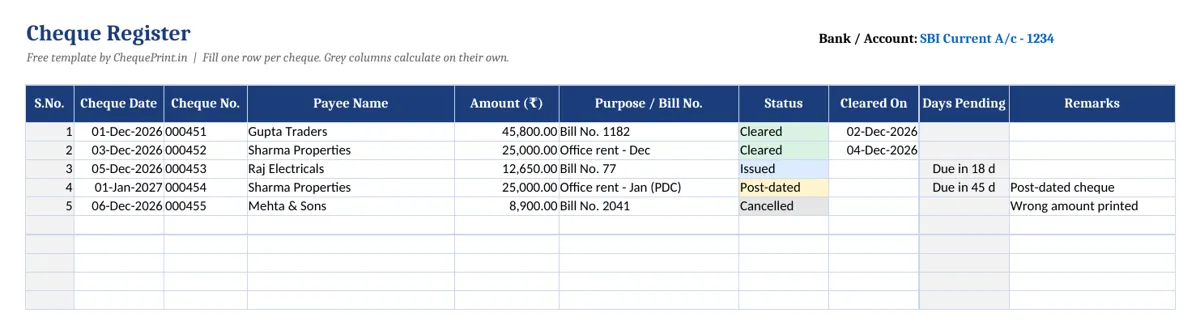
Columns for cheque date, cheque number, payee name, amount, purpose or bill number, status, cleared-on date and remarks. Two columns fill themselves:
- S.No. appears as soon as you type a payee name.
- Days Pending shows how many days an issued cheque has been out, or “Due in X d” for a post-dated one. It goes blank once the cheque is cleared, cancelled or stopped.
The Status column has a dropdown with six options: Issued, Post-dated, Cleared, Bounced, Stopped and Cancelled. Each one gets its own colour, so at a glance you can see what still needs attention. There’s room for 500 cheques, with a filter on every column.
2. Summary sheet
Count and total amount for each status, plus one figure that matters most at month end: Not yet cleared (issued plus post-dated). That’s the amount sitting in your books but not yet taken out by the bank, which is exactly what you need while matching your bank statement.
3. How to use sheet
Short instructions, in case someone else in the office picks up the file.
How to use it day to day
- Delete the five sample rows (leave the grey formula columns alone).
- Write the bank and account name in cell I1. Keep one file per bank account.
- Every time you sign a cheque, add a row. Do it right then, not at the end of the week.
- When the cheque shows in your statement, set Status to Cleared and put the date in Cleared On.
- Spoilt or wrongly printed leaf? Add it anyway with status Cancelled. Every cheque number should be accounted for.
Who it’s for
Small businesses, shops, societies, schools, landlords collecting rent cheques, and anyone who issues more than a few cheques a month. If you’re a CA or keep books for clients, make one copy per client per bank.
Want the register filled for you?
MoneyFlex cheque printing software prints the cheque and saves it in the issued list in the same step, with party-wise and month-wise reports. No double entry.
Common questions
Can I use it in Google Sheets?
Yes. Upload the file to Google Drive and open it with Google Sheets. The dropdown, colours and formulas carry over.
Is it really free?
Yes. Download it, change it, use it for your business. You don’t need to sign up.
Can I add more columns?
Of course. Add them to the right of Remarks so the formulas keep working.
Related free tools: post-dated cheque schedule maker and amount in words converter.